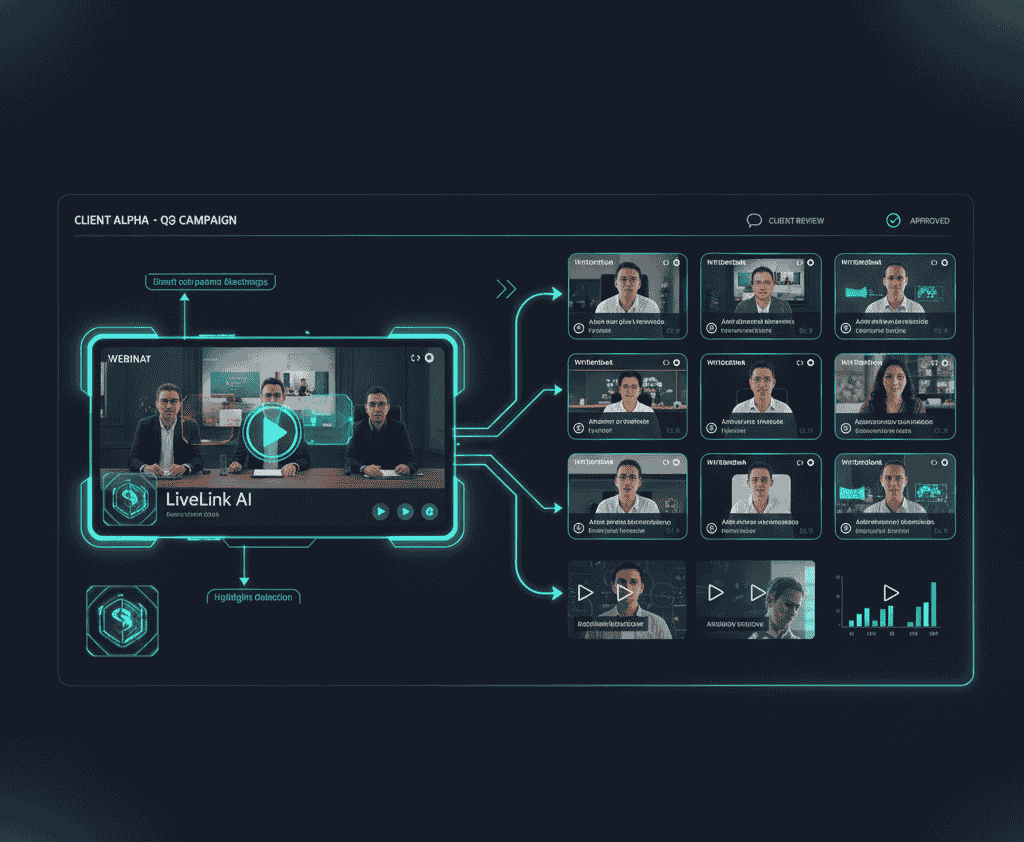
If you make marketing videos, you already know the pressure: more content, tighter deadlines, and the same or fewer resources. Long webinars, interviews, product demos, and livestreams hold the raw material. The hard part is turning hours of footage into bite-sized clips that actually perform on social platforms and in campaigns.
AI video clipping software promises to cut that work down dramatically. But what features matter, how real are the time savings, and how should teams adopt these tools without breaking existing workflows? This guide gives marketers a practical, research-backed playbook to choose, adopt, and get measurable value from AI clipping tools, with priority focus on LiveLink AI as a modern option built for agencies and in-house teams.
Quick snapshot
AI video clipping software uses automatic transcription, natural language processing, speaker detection, and scene analysis to find the best moments in longer videos and render them as clips ready for distribution. For marketers this means:
- faster content cycles
- more testable creative
- a predictable stream of social-ready assets
This guide covers features to demand, typical workflows, measurement priorities, implementation tips, and real use cases you can copy.
Why marketers are using AI clipping tools
Video has become central to marketing strategies, but production remains a bottleneck. AI clipping tools reduce manual editing, turning one source asset into many distinct pieces for channels like TikTok, Instagram Reels, YouTube Shorts, LinkedIn, and paid placements. For larger projects, combine this with the best tool for bulk video clipping to save time.
Marketers use these tools for three straightforward reasons:
- Content volume without heavy headcount increases
- Faster experiment cycles for creative testing
- Better consistency in brand presentation across clips
Top features to look for
When evaluating AI clipping software, prioritize features that directly affect speed, quality, and campaign outcomes. Here’s a checklist that separates useful tools from marketing noise.
Automatic transcription and timecoded transcripts
Accurate transcripts are the backbone of smart clipping. Timecoded text makes it easy to search the recording for keywords, quotes, and Q&A segments. The best systems also let you correct transcription errors quickly and apply those edits to captions.
Intelligent highlight detection
Not every loud moment is worth a clip. Effective AI looks for context — speaker emphasis, audience reaction, question markers, or repeating phrases — to surface moments with potential social value.
Speaker tracking and smart framing
AI that maintains visual focus on the speaker or subject while generating clips saves manual reframing. This is essential when you need vertical or square crops for social channels while keeping the subject centered.
Custom branding templates
Brand rules should be nonnegotiable. Look for tools that let you create templates with logos, fonts, and lower thirds and apply them in bulk.
Batch export and scheduling integration
A single webinar might produce 10 to 20 clips. Batch processing and connection to scheduling platforms lets you queue and publish without repetitive clicks.
Metadata automation and hashtag suggestions
Good clips need good metadata. Tools that suggest titles, descriptions, and even hashtags based on context save time and improve discoverability.
Analytics and variant testing
Track views, watch time, completion rate, and click-throughs. The best systems offer per-clip reporting and let you compare different hooks and thumbnails so you can iterate fast.
How the tech actually works
If you want to trust AI to run parts of the creative pipeline, it helps to understand the steps it follows.
1. Ingest and transcribe
The platform ingests the source file and creates a timecoded transcript. This is the raw data AI uses to find topic shifts and potential hooks.
2. Semantic analysis and highlight ranking
Natural language processing identifies phrases and sentences that have framing value: "how to", strong opinions, data points, or audience Q&A. The system ranks segments by likely engagement.
3. Visual analysis and framing
Computer vision detects faces, motion, and slide changes. Speaker tracking keeps the subject in frame when cropping for vertical or square formats.
4. Clip generation and templating
Selected segments are rendered as standalone clips. Brand templates, captions, and any graphic overlays are applied automatically.
5. Postprocessing and distribution
Clips are available for review, quick edits, and then export. Many tools include direct posting or scheduling options.
What marketers measure first
Adopting a tool is simple. Proving value is the hard part. Focus on these metrics early on:
- First 24 hour views and completion rate
- Average watch time per clip
- Engagement rate per clip (likes, comments, shares)
- Subscriber or conversion lift attributable to clips
- Time saved per clip compared to manual editing
Case teams often calculate an effective cost per clip by combining tool spend and editor time saved. That number is persuasive with stakeholders.
Real workflows you can steal
Here are two battle-tested workflows for content teams.
Workflow A in-house marketing team
- Record webinar or interview and upload to a shared drive.
- Use AI clip tool to auto-generate a set of 12 candidate clips.
- Content lead reviews and marks favorites, adjusts captions and CTA.
- Apply brand template and export 3 aspect ratios.
- Schedule posts for the next three weeks using your social scheduler.
- Track performance and push the top 3 clips into paid promotion.
Workflow B agency managing multiple clients
- Client uploads raw footage to agency workspace.
- Agency uses AI to create topic-based clip folders (product, testimonial, tutorial).
- Senior editor batch reviews and signs off the best clips.
- Agency tags clips by campaign and schedules posts across platforms with timezone targeting.
- Weekly report highlights top clips and recommended next topics.
These processes reduce friction and make repurposing repeatable.
Case study snapshots
SaaS launch
A B2B SaaS marketer used AI clipping to create 15 product microdemos from a single launch webinar. Clips were posted across LinkedIn, YouTube Shorts, and Twitter. The team reported a 30% lift in trial signups attributed to short-form demos in the first month.
Thought leadership series
An executive produced a long interview series. The content team turned each interview into 8 to 10 quote clips. Engagement on LinkedIn increased by 40% and new followers rose by 25% over two months.
Implementation checklist
Before you buy, make sure the tool meets these requirements:
- Accurate transcription with easy edits
- Support for multiple output aspect ratios
- Brand template features
- Batch export and scheduling connectors
- Reporting with exportable metrics
- Clear permissions and client workspace management
Also pilot the tool on one high-impact piece of content to measure time savings and performance uplift.
Common pitfalls and how to avoid them
Pitfall 1 using AI as a black box
AI makes mistakes. Always include a human review step for brand voice and compliance.
Pitfall 2 ignoring captions and accessibility
Failing to add captions costs views. Always enable captions and check them quickly.
Pitfall 3 rushing to publish
Not every clip should go live. Use testing windows, small paid boosts, and incremental rollout to see what works.
Comparing LiveLink AI with general tool types
LiveLink AI focuses on quick clip generation, speaker tracking, and batch exports with templates and scheduling options. Compared with desktop editors or general-purpose platforms, LiveLink AI trades granular manual control for speed and predictable output that fits marketing cycles. That trade is useful when volume and speed matter.
Market context and key numbers
AI and video trends show why clipping tools matter right now. Marketers should consider these signals when building budgets and timelines:
- video remains central to marketing strategies for most businesses
- short form content commands large attention on social platforms
- AI tools are driving higher output and time savings for teams
Final notes and next steps
AI video clipping software is a practical, measurable way to scale video output for marketing programs. If your team struggles with volume, timing, or cost, run a small pilot with one tool and one major asset. Track time per clip before and after and prioritize clips that drive measurable outcomes. Use templates for branded social clips to maintain consistency across campaigns.
If you want a fast start and agency-ready features, LiveLink AI is built for the workflows described here: batch clipping, speaker tracking, template application, and scheduling connectors that fit marketing calendars. Try a pilot on one webinar and compare results.
Who are Found and what is an office broker?
A clip is a self-contained short video extracted from a longer asset that communicates a single idea or hook.
Aim for 15 to 60 seconds for social. Platform and objective will shape exact length.
Most clips require a quick human pass for captions and CTAs but not deep edits.
Measure time saved, volume of clips produced, and performance lift in views or conversions. Translate time saved into cost saved for a clear ROI story.